pasby developer documentation
Integrate pasby identification, signing, OIDC, and document workflows into your applications.
Use the pasby API to authenticate users, request verified claims, confirm transactions, and run document signing — with flows that stay smooth, simple, and recognisable for end users.
How to get API keys
Console account, organisation keys, app secrets, and PEM files.
Quickstart
First v2 call in sandbox with cURL, TypeScript, or Python.
Identification
Same-device, different-device, and wildcard with full code samples.
Claims reference
Every claim key, encryption, and decrypt examples.
OIDC
Hosted login with PKCE at oauth.pasby.africa.
Your first call
Console setup, REST wildcard, or hosted OIDC.
Webhooks
Sign flows, correlation ids, and server verification.
TypeScript SDK
@finsel-dgi/pasby — v2 client for Node.js servers.
How pasby fits together
Identities are residents with a national ID (NIN). Your app (under a consumer organisation) requests claims through actions such as login or sign, governed by scopes.
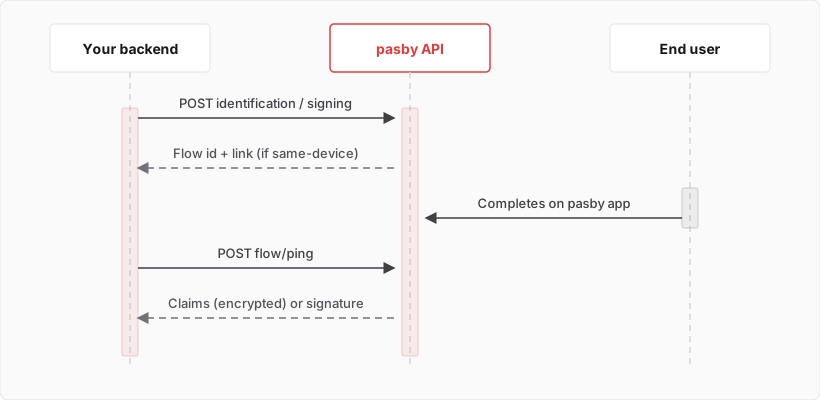
API surfaces
| Surface | Base URL | Guides |
|---|---|---|
| Public API v2 | https://s.pasby.africa (sandbox) · https://l.pasby.africa (production) | API reference · Endpoint index |
| OIDC | https://oauth.pasby.africa/api/v1 | OIDC quickstart |
Core topics
| Topic | Page |
|---|---|
| Credentials & PEM keys | How to get API keys · Credentials reference |
| Pick endpoints | Integration path |
| Decrypt claims after login | Handling encrypted claims |
| Poll / cancel flows | Flow lifecycle |
| Errors | Errors reference |
Get credentials
Create an app in the pasby console — follow How to get API keys for the full Console walkthrough, then the Quickstart.